
General description
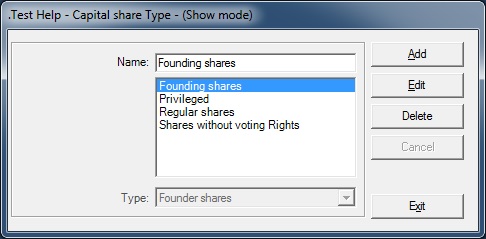
This form is used to display/add/edit/delete the name of the Capital Share types.
Usage of the Capital Share Types
- This form is called form the Parameters / Management / Capital Share Type menu and when clicking on one of the two Share Type Go buttons (Main and Detail tabs) of the Capital form.
Validation checks
- The Name field must be filled
- When adding a type, its name cannot exist already
- When editing a type, its new name must be unique
- When deleting a type, a check is made to verify if that type is not linked to an existing Capital
Rights and Options
- The user must have the rights to Display / Add / Edit / Delete data on this form
Fields description
- The Type field represent the Capital Share system type which can have five values: None / Ordinary shares / Priviledge shares / Founder shares / Shares with no voting rights.
- The Name field is the name you give to one of the system types:
- Ordinary shares
- Privileged shares
- Founder shares
- Shares with no voting rights
- None