
General description
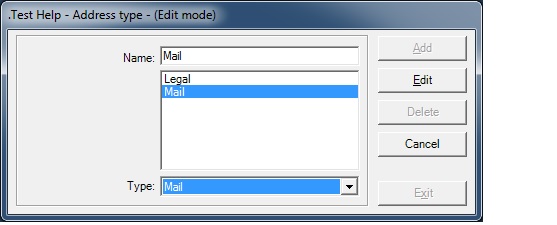
This form is used to display/add/edit/delete the name of the address types.
Usage of the Address Types
- This form is called from the Parameters / Management menu and when pressing F2 key when focus is on Type field or clicking on the Address Type Go button of the Address screen.
Validation checks
- The type field must be filled
- When adding a new type, its name cannot exist already
- When editing an existing type, its new name must be unique
- When deleting a type, a check is made to verify if that type is not linked to an existing address
Rights and Options
- The user must have the rights to Display / Add / Edit / Delete data on this form
Fields description
- Label: The name of the AddressType
- Type: the system type used for specific treatments by the application
- None: no system type associated to the address type
- Mail: this address type is used to store mail delivery address
- Legal: this address type is used to store legal addresses
- Invoicing: address type is used when recording invoices to client
- Delivery: address type is used for delivery addresses in purchase orders
- Pick Up: address type is used for pick up addresses in purchase orders