
General description
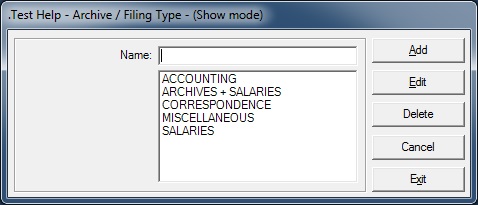
This form is used to display/add/edit/delete the name of the archive filing types (free categories).
The Filing Types allows tracking of the archived documents. The type allows users to categorize the archived documents.
Usage of the Archive / Filing Types
- This form is called from the Parameters / Management menu and when pressing F2 key when focus is on Type field or clicking on the Filing Type Go button of the Archive / Filing screen.
Validation checks
- The type field must be filled
- When adding a new type, its name cannot exist already
- When editing an existing type, its new name must be unique
- When deleting a type, a check is made to verify if that type is not linked to an existing archived document.
Rights and Options
- The user must have the rights to Display / Add / Edit / Delete data on this form
Fields description
- Name: The name of the Archive/Filing Type.