
General description
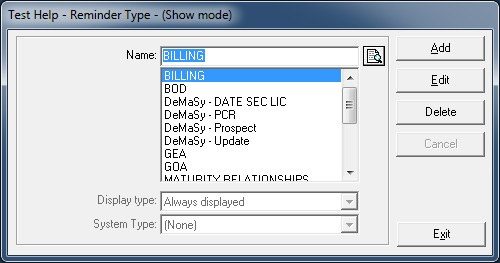
This form is used to display/add/edit/delete the Reminder types.
Usage of the Reminder Types
- This form is called from the Parameters / Management / Reminder Type menu and from the Reminders screen.
It allows the user to define types of reminders (agenda).
Ex: Shareholders ‘meetings , Board of Directors meeting - This parameter is used by the Relation module.
Validation checks
- The Name field must be filled
Rights and Options
- The user must have the rights to Display / Add / Edit / Delete data on this form.
Fields description
- Name: Name of the type of agenda
- Display Type: can be one of the three values:
Always displayed
Displayed in calendar
Not Displayed in calendar - System Type:
These system types are meant to be used for specific reporting purposes. They allow retrieving different type of information without depending on the wording used by a client:
General Ordinary assembly
General extraordinary assembly
Board of Directors
Shareholder invitation
Directors invitation
Other event
Maturity relation